Mitä uutta GanttPRO:ssa
Löydä uusia ominaisuuksia, viimeisimmät tuote päivitykset, parannukset ja katso, mitä on tulossa pian, jotta GanttPROsta tulee paras ratkaisu projektinhallintatarpeisiisi.

Kaikki päivitykset ja julkaisut
September, 2025


Tutustu uuteen tekoälyprojektien suunnittelijaan
Kuvaile projektisi haluamallasi tavalla – tekstillä, äänellä tai tiedostolla – ja saat kattavan suunnitelman, joka on valmis työstettäväksi. Tarvitsetko muutoksia? Kerro vain, mitä pitää säätää, ja se muokkaa vain juuri sitä osaa. Jokainen muokkaus tallennetaan uutena versiona, joten mitään ei menetetä. Saatavilla uusien projektien luomisen yhteydessä.


Luo projektisuunnitelmia tekoälyllä
Tutustu tekoälypohjaiseen Gantt-kaavion tekijään, joka muuttaa lyhyen kuvauksen valmiiksi käyttökelpoiseksi projektiksi — vain muutamassa sekunnissa. Saatavilla uusia projekteja luotaessa.

Uusia valuuttoja lisätty
Olemme laajentaneet budjetinseurantaan käytettävien valuuttojen luetteloa. Voit nyt käyttää AED-, SEK-, DKK-, INR-, CHF-, KZT- ja ISK-valuuttoja. Puuttuuko valuutta? Kerro meille osoitteessa support@ganttpro.com tai live-chatissa – autamme mielellämme.


Viikonpäivien merkinnät Gantt-kaaviossa
Lisäsimme Gantt-kaavioon viikonpäivien yksikirjaimiset merkinnät luettavuuden ja navigoinnin parantamiseksi. Näytetään, kun Zoomissa on Dagar käytössä.

Suosikkiprojektien mukautettu järjestys ja sivupalkin päivitykset
Voit nyt järjestellä suosikkiprojektit uudelleen vasemmassa sivupalkissa vetämällä ja pudottamalla, jotta ne ovat sinulle sopivimmassa järjestyksessä ja saat nopeamman pääsyn. Siirsimme myös alatunnisteen osiot samaan sivupalkkiin. Saat selkeämmän ja virtaviivaisemman asettelun sekä siistimmän käyttökokemuksen sovelluksessa.


Uusia kieliä lisätty
Lisäsimme beta-versioon 13 uutta kieltä: ranska, italia, puola, hollanti, ruotsi, norja, suomi, ukraina, turkki, hindi, kiina, japani ja vietnam. Voit vaihtaa ne profiilisi asetuksissa. Koska testaamme niitä parhaillaan, haluaisimme kuulla palautteesi. Jos huomaat epäjohdonmukaisuuksia, ole hyvä ja ota meihin yhteyttä osoitteessa support@ganttpro.com.


Käytäntöjen ja ehtojen päivitys
Olemme päivittäneet Käyttöehdot, Tietosuojakäytännön ja Tietojenkäsittelyn lisäosien.


Introducing new improvements
Additional description field in resource's cards so that you can provide extra details. Ability to change avatar color of virtual resources for their visual differentiation.


Introducing new improvements
The header and project grid redesign. This will make it much easier for you to navigate and read data. An improved and redesigned drag-and-drop feature in the project grid will bring you a new user-friendly experience. The Select action in the context menu for faster interaction with the bulk change. Improved collaboration and performance for large teams and projects.

Introducing new improvements
We've eliminated the risks of assigning simultaneous tasks to resources working on multiple projects. Now, you can see the workload on all of their projects and prevent dangerous resource overload scenarios.

October GanttPRO update
Greatly improved and updated the "Team & Resources" section that has moved to the Profile settings. You can now manage team members and resources from their personal cards. Find more details here. Bulk change in the List view. Apply changes to multiple tasks - just like you do in the Gantt chart view. Find more details here. Updated sidebar for your simpler and more convenient navigation. Ability to pin an unlimited number of favorite projects in the sidebar. Three new API requests. Get timelogs, comments, or attachments with one request for the whole project.

August GanttPRO update
Password-protected Public URL. Be sure that your shared project can only be viewed by those for whom it is intended. Improved comments. Any text written by members deleted from the team will not be deleted with them. Comments remain in place with a note that the user has been deleted.

What's new in the July GanttPRO update:
Project statuses. Use the default statuses or create your own for even more transparent and efficient project management. Improvements in the List view. Create tasks right inside the list, visualize overdue and closed tasks, and use the familiar tabular view – just like in the Gantt chart mode.

Introducing new features and improvements
Project structure. We have removed subprojects as units, so you don't get lost in tasks. The structure became more transparent: Projects – Tasks – Subtasks. Task field. We have improved the UX design, so that you can go directly to the task settings for data entry faster. Performance improvements.


Introducing new features and improvements!
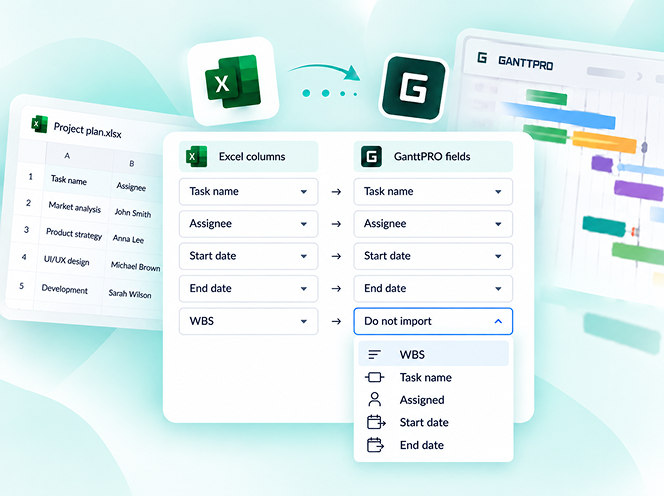
Custom fields import from Excel: Text, Number, and Date. Recalculation of task duration after changes in resource's calendar. API update: now, you can create parent tasks. Integration with JIRA has been improved. Overall performance has been improved.


Help us make GanttPRO better!
We work hard on new rights, roles, and groups. If you have encountered any inconvenience in making your workflow in GanttPRO, drop us a line at stas@ganttpro.com. We are looking forward to your feedback.

Introducing new features!
Expanding/Collapsing tasks on a project and project portfolio levels. Possibility to choose "Do not display" task names on the chart. Possibility to choose a way to depict closed tasks: strikethrough or grayed out. Redesign of project and group of tasks bars. Manual date entry in the grid.


Introducing the "Predecessor" column!
Meet Predecessor, a new column that will help you quickly create, manage, and navigate through dependencies right from the grid.


We improved GanttPRO in the December release!
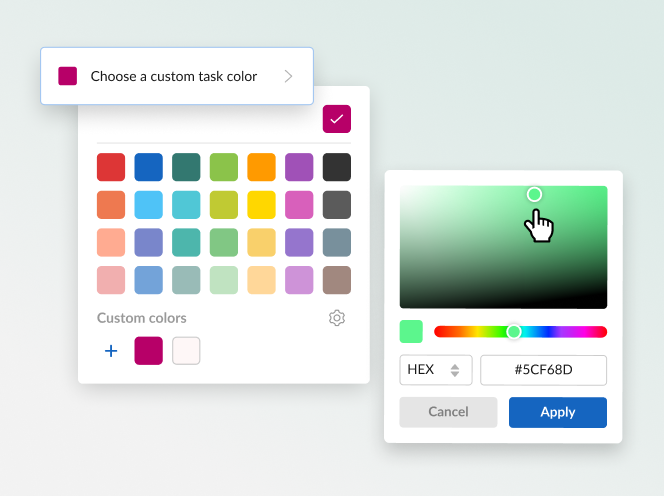
Filters by overdue tasks. Quick jump to specific projects from project portfolios. Project color customization in project portfolios.

We improved GanttPRO in the November release!
Portfolio export. Portfolio sharing with Public URL. The Korean language.


We improved GanttPRO in the July release!
Auto scheduling improvement. Real-time collaboration improvement. Ability to change the columns order with drag & drop in the project grid except for the "Task name" column. Your templates save most of the project settings except for calendars and skins. Ability to export resource workload to xlsx. Overall performance improvement.



Päivitetty integraatio Jiran kanssa
Uusi mukautettu kenttä Kaava
Jaa tehtävät
Toistuvat tehtävät